Large File Upload to AWS S3 using Presigned URL and Multipart Upload
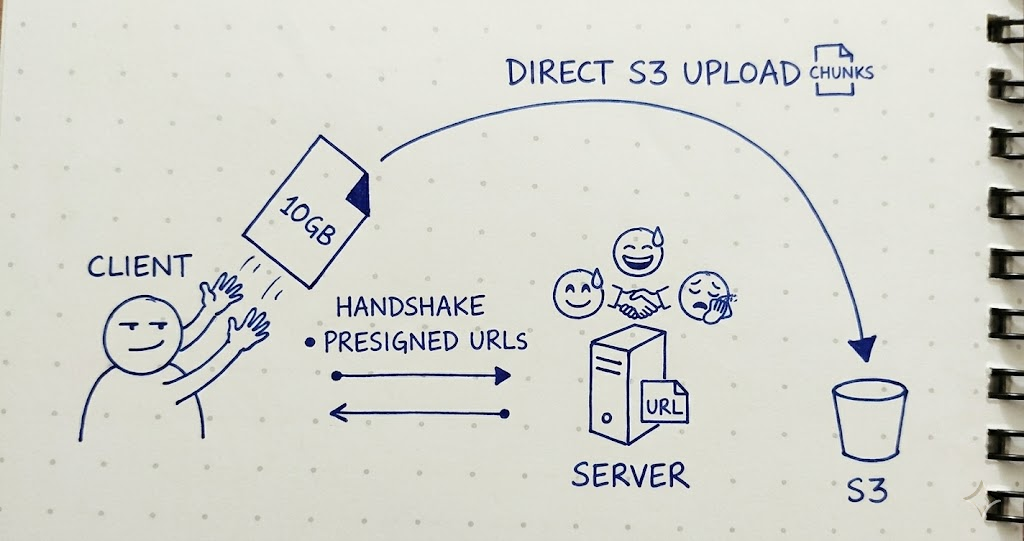
Traditional file uploads route every byte through the application server. For multi-gigabyte files that means long-held connections, memory pressure, request timeouts, and a server that becomes a bottleneck under load. The challenge was to upload files of virtually any size reliably, without putting that weight on the backend.
Approach
The uploader is built around S3 multipart uploads. A file is split into fixed-size chunks in the browser; each chunk is uploaded independently to a presigned URL, and S3 reassembles them into the final object. The application server never receives the file data; it only issues credentials and records progress.
Flow
1. Initiate
The client sends the file's name, size, and MIME type. The server then:
Validates the request and builds a unique object key in the form
uploads/{uuid}/{filename}, so two files with the same name never collide.Divides the file size by the configured chunk size to work out how many parts are needed, and rejects the upload if that exceeds the S3 part limit.
Opens a multipart upload on S3, which returns an
UploadIdthat ties all the parts together.Stores a record with the key, size, MIME type,
UploadId, and a status ofuploading.Generates a short-lived presigned
PUTURL for every part and returns them, with the chunk size, to the client.
$key = "uploads/{$uuid}/{$name}";
$partCount = (int) ceil($size / $chunkSize);

$uploadId = $s3->createMultipartUpload($key, $mimeType);

$media = Media::create([
    'path'      => $key,
    'size'      => $size,
    'status'    => 'uploading',
    'upload_id' => $uploadId,
]);

return [
    'media_id'   => $media->id,
    'chunk_size' => $chunkSize,
    'parts'      => $s3->presignParts($key, $uploadId, $partCount),
];
Presigning the parts. presignParts() generates one signed URL per part up front, so the client can upload the whole file without returning to the application server until the finalize step. For each part number it describes the UploadPart call S3 expects, then signs it into a temporary URL:
public function presignParts(string $key, string $uploadId, int $partCount): array
{
    $parts = [];

    for ($partNumber = 1; $partNumber <= $partCount; $partNumber++) {
        // Describe the UploadPart request S3 expects for this part.
        $command = $s3->getCommand('UploadPart', [
            'Bucket'     => $bucket,
            'Key'        => $key,
            'UploadId'   => $uploadId,
            'PartNumber' => $partNumber,
        ]);

        // Sign it into a temporary URL valid for the configured TTL.
        $request = $s3->createPresignedRequest($command, "+{$ttl} minutes");

        $parts[] = [
            'part_number' => $partNumber,
            'url'         => (string) $request->getUri(),
        ];
    }

    return $parts;
}
Each URL is bound to one specific PartNumber of one specific UploadId, and the AWS signature is carried in the URL's query string. That is what lets the browser PUT directly to S3 with no AWS credentials of its own, and only within the TTL window.
2. Transfer
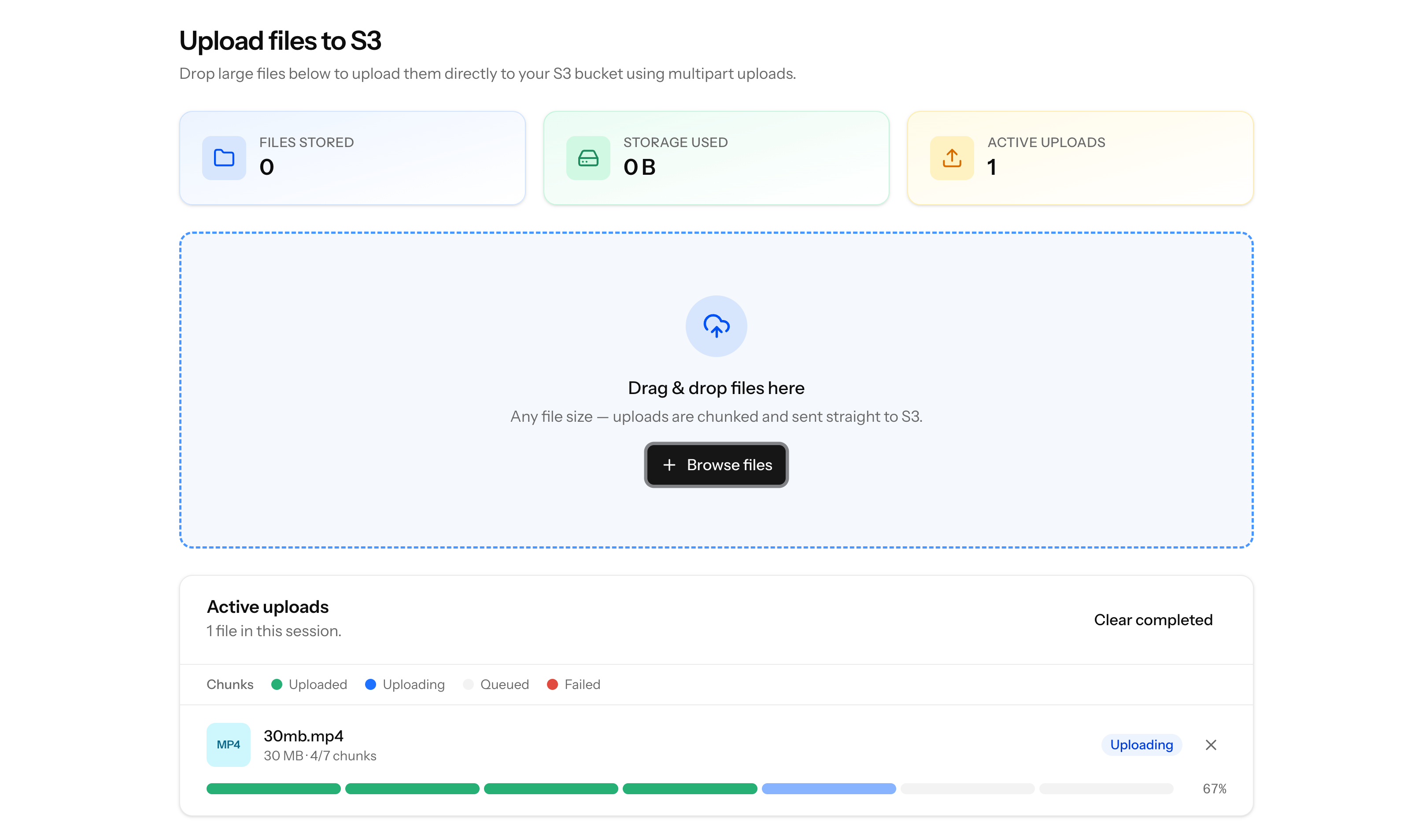
The browser uploads the file itself, one part at a time, and the file data never passes through the application server. For each presigned part, the client maps the part number back to a byte range, slices that range out of the file, and sends it:
Part number
Ncovers the byte range starting at(N - 1) * chunkSize. The end is clamped to the file size, so the final part carries whatever bytes remain.File.slice(start, end)returns a lightweightBlobview of that range. It does not read the file into memory, so even a multi-gigabyte file is streamed from disk rather than buffered.Each slice is sent with an HTTP
PUTdirectly to that part's presigned URL. No headers or credentials are attached, because the signature is already in the URL.S3 returns an
ETagfor the stored part in the response header. The client keeps eachETagwith its part number for the finalize step.After each part, uploaded bytes are added up to update progress.
Because the presigned URLs are valid only for a fixed window, the client must finish every part before they expire.
const chunkSize = upload.chunk_size;
let uploadedBytes = 0;

for (const part of upload.parts) {
    // Map the part number back to a byte range in the file.
    const start = (part.part_number - 1) * chunkSize;
    const end = Math.min(start + chunkSize, file.size);

    // Blob.slice() is a lazy view, not a copy: the file is never fully buffered.
    const blob = file.slice(start, end);

    // Stream just this slice straight to its presigned URL.
    const response = await fetch(part.url, { method: 'PUT', body: blob });

    completedParts.push({
        part_number: part.part_number,
        etag: response.headers.get('ETag'),
    });

    uploadedBytes += end - start;
    progress = Math.round((uploadedBytes / file.size) * 100);
}
3. Finalize
Once every part is uploaded, the client posts the collected part numbers and ETags back to the server. The server then:
Sorts the parts by number and hands them to S3's complete-multipart-upload call.
S3 stitches the parts into a single object and makes it available.
The record is updated to a status of
completed.
$s3->completeMultipartUpload($media->path, $media->upload_id, $parts);

$media->update(['status' => 'completed']);
4. Cancel or fail
If the user cancels or a part fails, the server aborts the multipart upload. S3 then discards any parts already received, so incomplete uploads never accumulate storage cost.
$s3->abortMultipartUpload($media->path, $media->upload_id);
AWS Configuration
The application talks to S3 through a single client built from Laravel's S3 filesystem disk, so credentials and region come from standard environment variables:
AWS_ACCESS_KEY_ID=your-access-key
AWS_SECRET_ACCESS_KEY=your-secret-key
AWS_DEFAULT_REGION=us-east-1
AWS_BUCKET=your-bucket-name

UPLOAD_CHUNK_SIZE=5242880        # part size in bytes (5 MB, the S3 minimum)
UPLOAD_PRESIGNED_URL_TTL=30      # presigned URL lifetime, in minutes
A few pieces of S3-side setup make the direct-to-browser flow work:
Bucket CORS policy. Since the browser uploads parts straight to S3, the bucket must allow cross-origin PUT requests from the application's domain. It must also expose the ETag response header, otherwise the client cannot read the part identifiers it needs to finalize the upload.
[
  {
    "AllowedOrigins": ["https://your-app-domain.com"],
    "AllowedMethods": ["PUT"],
    "AllowedHeaders": ["*"],
    "ExposeHeaders": ["ETag"]
  }
]
IAM permissions. The credentials need permission to create, upload, complete, and abort multipart uploads, plus delete objects: s3:PutObject, s3:AbortMultipartUpload, and s3:DeleteObject on the bucket's objects. s3:GetObject is only required if you also serve downloads.
Chunk size limits. S3 requires every part except the last to be at least 5 MB and allows a maximum of 10,000 parts per upload. The chunk size is configurable but bounded by these rules, which together cap the largest supported file.
Technologies Used
Laravel 13 (PHP 8.4): orchestrates the upload, signs URLs, and tracks state
AWS SDK for PHP: S3 multipart upload API and presigned URL generation
Amazon S3: chunked object storage
Vue 3: browser-side file chunking and transfer
MySQL: upload metadata and status tracking